Linux 如何去监控一个文件夹
在与网友的交流中,有人提到这样一个需求:如何监控一个文件夹,当其内容发生变化时,将变化的内容同步到目标文件夹中,保持两者一致。这让我联想到在实际开发中,文件夹同步的需求场景,比如:
- 配置文件的实时同步。
- 多设备间的日志或数据共享。
- 特定目录的备份操作。
针对这种需求,本文介绍两种实现方式:
- 基于
inotify的实时监控(推荐); - 基于轮询的监控(适用于不支持
inotify的场景)。
1. 解决方案概述
本解决方案使用了脚本语言来实现文件夹监控和同步的功能,具体思路如下:
- 文件夹监控:通过 Linux 系统提供的文件监控工具(如
inotify)实时监听文件夹内的变化事件。 - 自动同步:当检测到变化(如文件新增、修改或删除)时,自动触发同步操作,将变化同步到目标文件夹。
2.方案实现
2.1 方法一:基于 inotify 的实时监控
1. 什么是 inotify?
inotify 是 Linux 提供的一种内核机制,可以实时捕获文件系统的事件,例如文件的创建、删除、修改等。我们可以通过工具 inotify-tools 来使用这一功能,编写高效的文件夹监控脚本。
2. 安装 inotify-tools
如果你的系统尚未安装 inotify-tools,可以通过以下命令安装:
bash复制代码# Debian/Ubuntu
sudo apt-get install inotify-tools

# CentOS/RHEL
sudo yum install inotify-tools
以下将详细介绍脚本实现的过程。
2.2 方法二:基于轮询的监控
1. 轮询方式的优缺点
轮询是一种简单的监控方法,通过定时扫描文件夹的状态,检测变化并执行操作。它不依赖额外工具,适用于无法使用 inotify 的环境(如某些嵌入式系统)。 缺点是对资源的占用较大,实时性稍差。
2.3 脚本语言
脚本语言这里将两种方法都写入一起,加入支持inotify,将优先使用inotify。
#!/bin/bash

# Function to display usage
usage() {
    echo "Usage: $0 <source_directory> <destination_directory> [--verbose]"
    exit 1
}

# Check if the correct number of arguments is passed
if [ $# -lt 2 ]; then
    usage
fi

# Get the arguments
SOURCE_DIR="$1"
DEST_DIR="$2"
VERBOSE=false

if [ "$3" == "--verbose" ]; then
    VERBOSE=true
fi

# Check if the source and destination directories exist
if [ ! -d "$SOURCE_DIR" ]; then
    echo "Error: Source directory $SOURCE_DIR does not exist."
    exit 1
fi

if [ ! -d "$DEST_DIR" ]; then
    echo "Error: Destination directory $DEST_DIR does not exist."
    exit 1
fi

# Function to print verbose messages
verbose_echo() {
    if $VERBOSE; then
        echo "$1"
    fi
}

# Check if inotify-tools is installed
if ! command -v inotifywait &> /dev/null; then
    echo "Warning: inotify-tools is not installed. Falling back to polling."
    FALLBACK=true
else
    FALLBACK=false
fi

# Sync logic for inotify
inotify_sync() {
    verbose_echo "Using inotify for directory monitoring..."
    inotifywait -m -r -e create,modify,delete "$SOURCE_DIR" --format '%w%f %e' | while read FILE EVENT; do
        RELATIVE_PATH="${FILE#$SOURCE_DIR/}"
        DEST_PATH="$DEST_DIR/$RELATIVE_PATH"

        case $EVENT in
            CREATE,ISDIR)
                verbose_echo "Directory created: $FILE"
                mkdir -p "$DEST_PATH"
                ;;
            CREATE|MODIFY)
                verbose_echo "File created or modified: $FILE"
                mkdir -p "$(dirname "$DEST_PATH")"
                cp "$FILE" "$DEST_PATH"
                ;;
            DELETE|DELETE,ISDIR)
                verbose_echo "File or directory deleted: $FILE"
                rm -rf "$DEST_PATH"
                ;;
        esac
    done
}

# Sync logic for fallback (polling)
polling_sync() {
    verbose_echo "Using polling method for directory monitoring..."
    TEMP_FILE="/tmp/prev_files.txt"

    # Initially record the current list of files and directories
    find "$SOURCE_DIR" -type f | sort > "$TEMP_FILE"

    while true; do
        CURRENT_FILES=$(find "$SOURCE_DIR" -type f | sort)

        if ! diff <(echo "$CURRENT_FILES") "$TEMP_FILE" > /dev/null; then
            verbose_echo "Changes detected, syncing..."
            rsync -av --delete "$SOURCE_DIR/" "$DEST_DIR/"
            echo "$CURRENT_FILES" > "$TEMP_FILE"
        fi

        sleep 0.5
    done
}

# Use appropriate method based on tool availability
if $FALLBACK; then
    polling_sync
else
    inotify_sync
fi
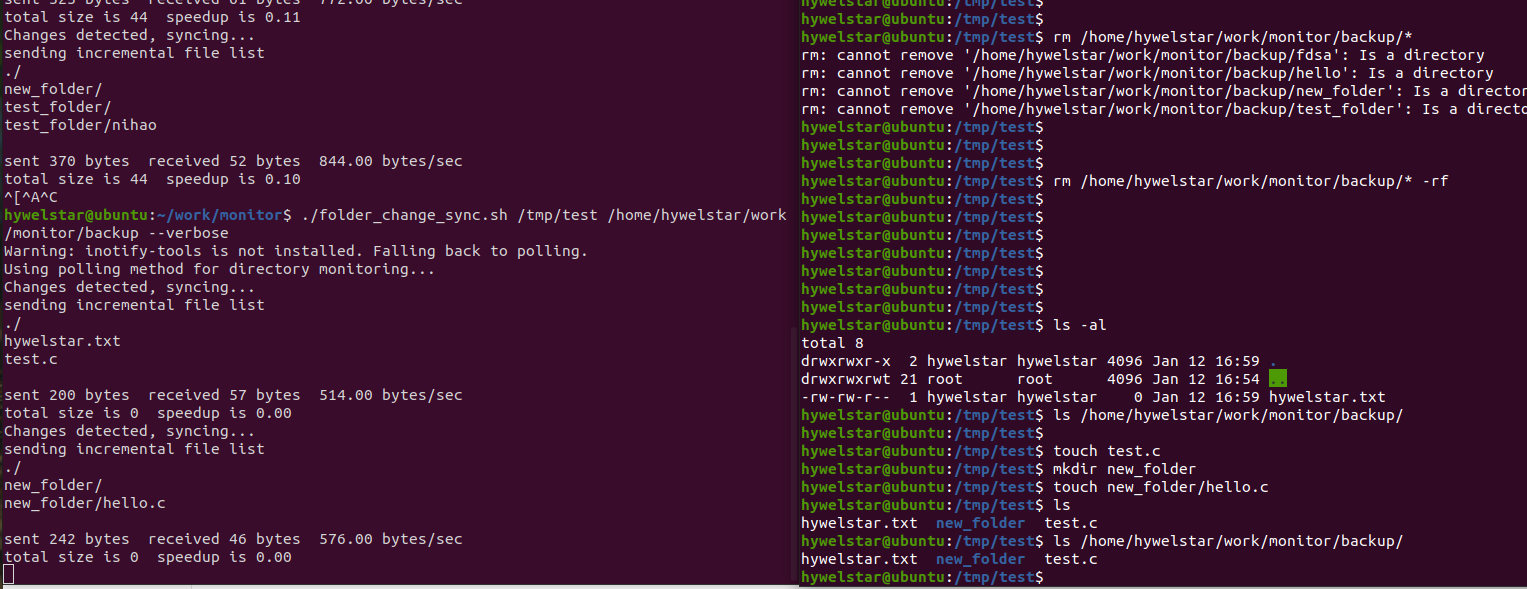
2.4 测试结果:
帮助信息:

3.适用场景
- 实时备份 对重要的配置文件或日志文件进行实时同步,避免数据丢失。
- 日志收集 将分布在多台设备上的日志文件集中到一个统一的目录,方便后续分析处理。
- 多节点配置同步 在分布式系统中,实时同步节点的配置文件,确保系统一致性。
- 文件夹快照 定期监控文件夹状态,生成版本快照,便于版本管理和数据恢复。
4.总结
本文介绍了两种实现文件夹监控的方法:基于 inotify 的实时监控,和基于轮询的监控这两种方法通过简单的 Shell 脚本即可实现,部署便捷,适合多种场景需求。如果是嵌入式设备,可能后者更加通用。